
Many people find plain text boring, which is why email programs offer HTML support, allowing you to create emails that are more likely to grab the user's attention. Of course, there is a downside to this feature. Attackers can use HTML to create emails that hide malicious URLs behind buttons or text that appear to be harmless.
As seen in the image above, the address the user sees when clicking on a link can be different (the real address is seen when the user hovers over the link).
In most phishing attacks, the attackers take a new domain address and complete a phishing attack within a few days. Therefore, if the domain name in the email is new, it is more likely to be a phishing attack.
By querying VirusTotal for web addresses in emails, you can find out if the antivirus engines detect the web address as harmful. If someone else has already analyzed the same address/file in VirusTotal, VirusTotal will not analyze it from scratch, it will show you the old analysis result. This feature can be considered both an advantage and a disadvantage.

If the attacker searches the domain address in VirusTotal when it does not contain malicious content, this address will appear to VirusTotal to be harmless. However, if you miss this tiny detail, you could be fooled into thinking that this address is harmless. In the image above you can see that the address umuttosun.com appears to be harmless, but if you look at the section marked with a red arrow you can see that this address was scanned 9 months ago and this result is 9 months old. To scan it again, click the blue arrow button.
If the site was previously scanned by VirusTotal, it could mean that the attacker wanted to see the detection rate of the site during the preparation phase. If we analyze it again, the antivirus engine will detect it as phishing, which means that the attacker tried to trick the analysts.
Performing a static analysis of the files in the email can provide insight into the capacity/capability of the file. However, since static analysis takes a long time, dynamic analysis can provide the information you need more quickly.
Cisco Talos Intelligence has search sections where we can learn the reputation of IP addresses. By looking up the SMTP address of the email we detected in Talos, we can see the reputation of the IP address and find out if it is on the blacklist. If the SMTP address is blacklisted, it can be assumed that the attack was carried out on a compromised server.
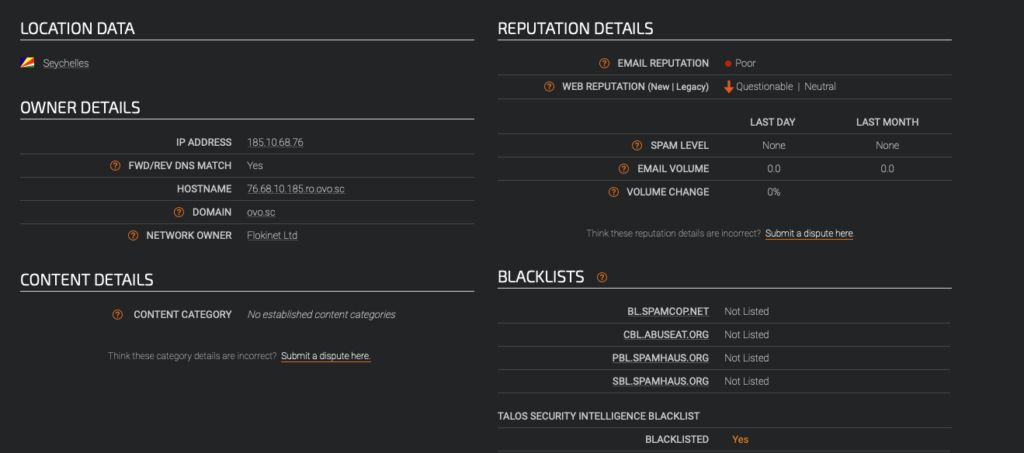
Similarly, the SMTP address can be searched on VirusTotal and AbuseIPDB to find out if the IP address has been involved in malicious activity in the past.