| Medium | Mar, 14, 2021, 07:15 PM | SOC137 - Malicious File/Script Download Attempt | 76 | Malware |
|---|
In this walkthrough, we will analyze a letsdefend.io alert. Let’s start with alert information.
EventID :76
Event Time :Mar, 14, 2021, 07:15 PM
Rule :SOC137 - Malicious File/Script Download Attempt
Level :Security Analyst
Source Address :172.16.17.37
Source Hostname :NicolasPRD
File Name :INVOICE PACKAGE LINK TO DOWNLOAD.docm
File Hash :f2d0c66b801244c059f636d08a474079
File Size :16.66 Kb
Device Action :Blocked
Download (Password:infected) :<https://files-ld.s3.us-east-2.amazonaws.com/f2d0c66b801244c059f636d08a474079.zip>
The event involved a blocked attempt to download a potentially malicious file named INVOICE PACKAGE LINK TO DOWNLOAD.docm
from the URL provided. Further analysis is needed to understand whether
the file is malicious or not, and take measures accordingly.
Normally, we would download the file and extract its hash to perform an analysis,
but the MD5 hash is already provided by the alert report as f2d0c66b801244c059f636d08a474079. It’s also literally the file’s name.🕵️♂️ So we can diretly use this hash in our analysis.
Still, if you wonder how to get a file hash manually, here are the steps for Windows:
If you have downloaded the file onto your protected environment and, you may want to learn the hash value of the file. You can simply do this in Windows environment from powershell using Get-FileHash.
Get-FileHash C:\Users\user1\Downloads\f2d0c66b801244c059f636d08a474079.zip -Algorithm MD5
Output:
Algorithm       Hash                              Path
---------       ----                              ----
MD5             f2d0c66b801244c059f636d08a474079 C:\Users\user1\Downloads\...
As you can see, “f2d0c66b801244c059f636d08a474079” is the obtained md5 hash.
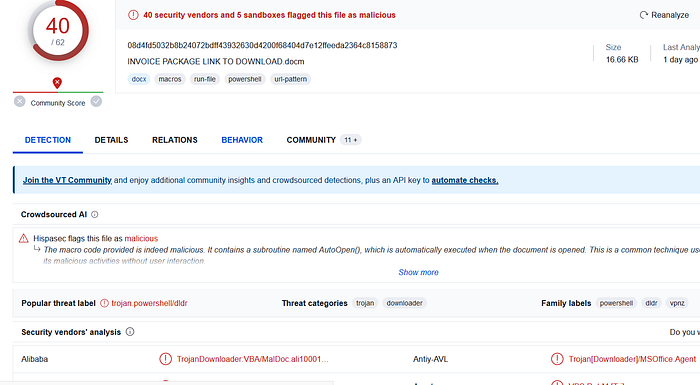
After getting the hash, let’s search the file in Virustotal.
Figure 1 — Virustotal Results
As you can see it’s flagged as malicious by 40 security vendors and 5 sandboxes. Also in comment section we see that Filescan.io has also flagged it as malicious. At this point we can be sure that the file is not innocent.
Let’s read the Virustotal’s AI summary about the file before looking for more details:
The macro code provided is indeed malicious. It contains a subroutine named AutoOpen(), which is automatically executed when the document is opened. This is a common technique used by malware to initiate its malicious activities without user interaction. The AutoOpen() subroutine uses the Shell function to execute a PowerShell command. The PowerShell command is obfuscated, but upon closer inspection, it appears to be creating a new .NET WebClient object and invoking its DownloadString method. This method downloads a file from a specified URL (‘https://filetransfer.io/data-package/UR2whuBv/download') and executes it. This behavior is highly suspicious as it’s a common tactic used by malware to download and execute additional payloads from the internet. These payloads can contain any type of malicious software, such as ransomware, spyware, or trojans. Furthermore, the use of obfuscation in the PowerShell command is another strong indicator of malicious intent. Obfuscation is often used by malware authors to hide their code’s true purpose and evade detection by security software. In conclusion, this macro exhibits several signs of malicious behavior, including automatic execution upon document opening, downloading and executing files from the internet, and code obfuscation.
Although this summary roughly summarizes the behavior of the file and why it is malicious, let’s take a look ourselves. Click on “Behavior” tab to see anything interesting.