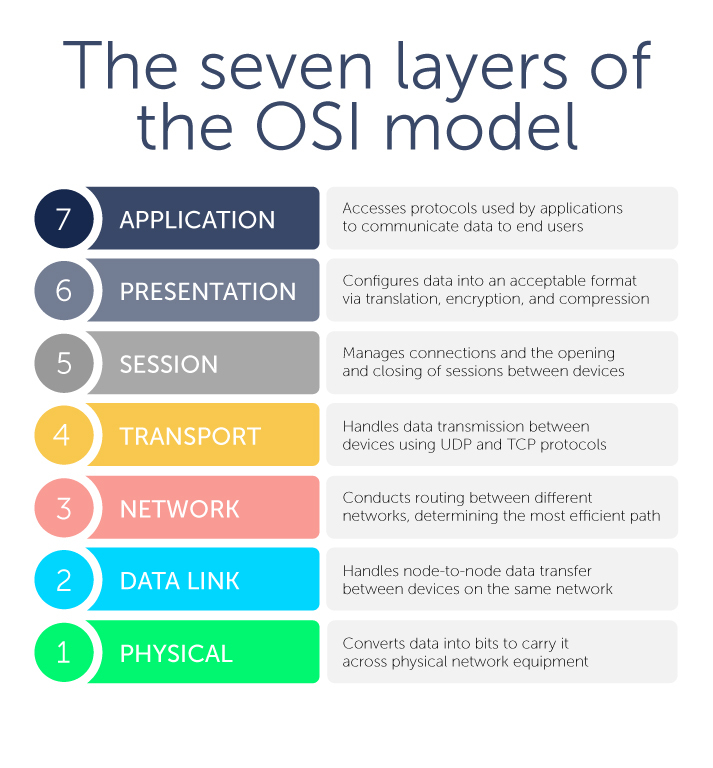
This layer is closest to the end user. However, it’s important to note that software applications themselves (like, say, Microsoft Word) aren’t part of this layer. Rather, the application layer encompasses the protocols that applications rely on to perform their job and communicate data to end users.
Protocols that are part of the application layer would include Hypertext Transfer Protocol (HTTP) if you’re using web browsers, Simple Mail Transfer Protocol (SMTP) if you’re using an email client, File Transfer Protocol (FTP) if you’re transferring files, as well as a number of others.
DNS resides at Layer 7 as well. More on that in a moment.
This layer configures data for the application layer into a format that it will accept. There are three ways in which it does this: translation, encryption (and decryption), and compression.
Translation converts all the binary 1’s and 0’s into machine-readable data. If devices are using different communication methods, the presentation layer translates the data into an understandable language for the receiving device at Layer 7.
Furthermore, if the connection is encrypted, Layer 6 adds encryption from the sender and decrypts for the receiver. As a result, the application layer receives unencrypted data. A prime example would be web browsers and servers using SSL, the encryption security protocol.
Finally, the presentation layer is responsible for compressing data that it gets from Layer 7 before it sends it down the stack to Layer 5. For example, it might compress a 30-megabyte file down to a 10-megabyte file before transferring it to the session layer. Compression bolsters efficiency and speed, which becomes especially important when involving large video and audio files.
This layer is about managing connections—also known as sessions—between two or more devices. In particular, it controls when these communication sessions start and stop. Using ports defined in Layer 4, Layer 5 ensures that sessions stay open to transfer all the necessary data and then closes sessions when they’re done.
The session layer handles user authentication from usernames and passwords, as well as any other authentication protocols, and user logoff to terminate sessions.
Next, this layer handles data transmission between devices using User Datagram Protocol (UDP) or Transmission Control Protocol (TCP). If data units are big and exceed maximum packet sizes, they are split up into smaller pieces called segments before they are sent down the stack to Layer 3. Receiving devices also reassemble these segments at Layer 3.
Segments have a sequence number associated with them. As data packets are split into smaller chunks, they have to be put back in the right order for reassembly.
Layer 4 also conducts flow control and error control. Flow control ensures that data is moving between senders and receivers at an optimal rate to ensure that a fast connection doesn’t overwhelm a slow one. A receiving device with a slower connection will acknowledge that “Yes, I’ve received these segments, go ahead and send the next ones.”
Meanwhile, error control checks the sums that are part of the packet to make sure that the data received is complete and correct.
Layer 4 also identifies which ports Layer 5 will use for conducting sessions for various functions. For example, DNS uses Port 53 which is nearly always open on systems, firewalls, and clients to transmit DNS queries. Web servers, meanwhile, use port 80 for HTTP or 443 for HTTPS.