As a SOC Analyst, you will perform a lot of log analysis. For this reason, it is important to be familiar with "Log Management" systems/solutions. It doesn't matter what product you use, it's about knowing what to look for and where to look for it.
The remainder of this lesson discusses how "Log Management" solutions can be used effectively by SOC analysts.
As the name implies, Log Management provides access to all logs in an environment (web logs, OS logs, firewall, proxy, EDR, etc.) and allows you to manage them in one place. This increases efficiency and saves time.
If you can't access the logs from one place, then the same request (e.g., the goal is to determine all users on letsdefend.io) would have to be sent to different devices. This would increase your margin for error and the amount of time you would need to spend.
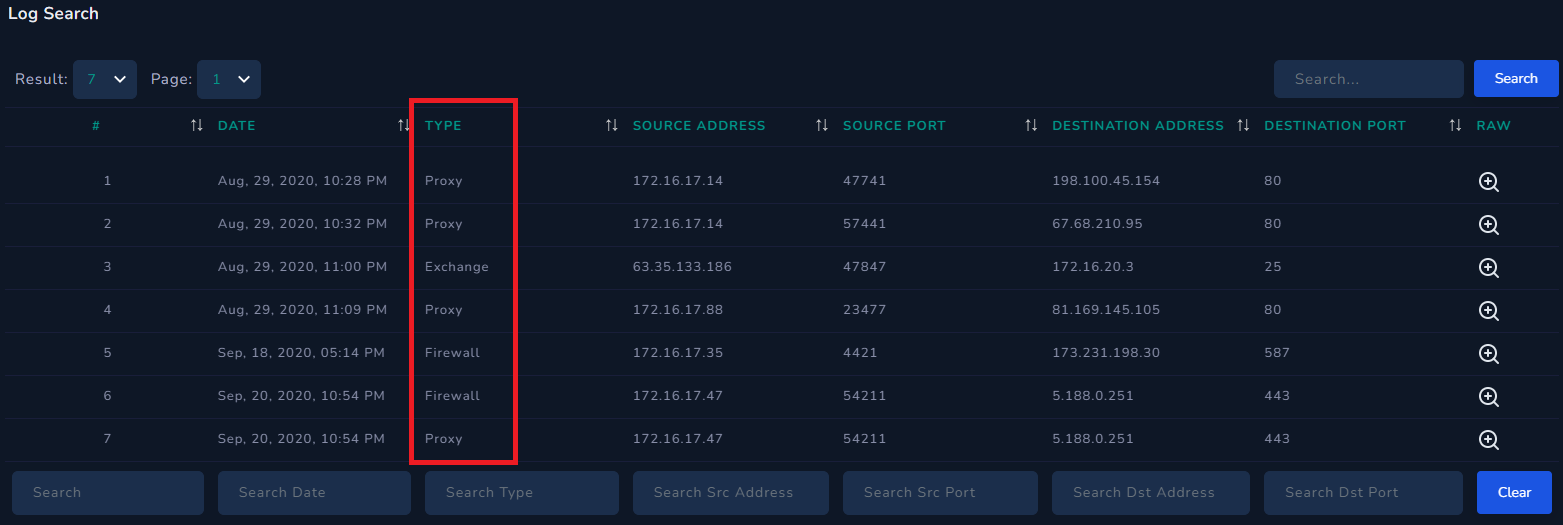
If you go to the "Log Management" page in LetsDefend, you will see various log sources such as Proxy, Exchange, and Firewall listed as "Type". This means that all these log sources have been collected in one place and log output from sources like Proxy, FW, etc. can be seen with just one query.
SOC analysts typically rely on Log Management to determine if there is any communication with a particular address and to view the details of that communication. Let's say you came across a piece of malware and after running it, you found that it was communicating with and executing commands from the "letsdefend.io" address. In this situation, the command&control center is "letsdefend.io", you can search for "letsdefend.io" in your company's log management to see if any devices have attempted to communicate with the command&control center.
This leaves us with a second situation: You see a SIEM alert indicating that a LetsDefendHost device on your network is leaking data to IP address 122[.]194[.]229[.]59. You have conducted an investigation, isolated the device from the network, performed the necessary processes, and now you are in control. But there's still something you haven't addressed: are there any other devices sending data to the suspicious IP address (122[.]194[.]229[.]59)? The alert may have only included LetsDefendHost, but you should still search for the suspicious address in Log Management to see if there is anything the system may not have detected and try to find any connections.