To identify an anomaly, we should first understand how the technology works. Applications use specific protocols to communicate with each other. In this case, web applications communicate using the Hyper-Text Transfer Protocol (HTTP). Let's take a look at how the HTTP protocol works.
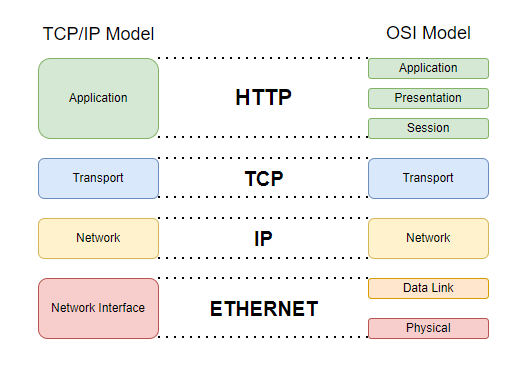
First of all, it's important to know that the HTTP protocol is on layer 7 of the OSI model. This means that protocols such as Ethernet, IP, TCP, and SSL are used before the HTTP protocol.
HTTP communication is between the server and the client. First, the client requests a specific resource from the server. The server receives the HTTP request and sends an (HTTP response) back to the client after passing the request through certain controls and processes. The client's device receives the response and displays the requested resource in an appropriate format.
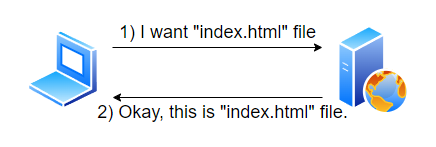
Let's take a closer look at HTTP requests and HTTP responses.
An HTTP request is used to retrieve a specific resource from a web server. This resource can be an HTML file, a video, JSON data, etc. The web server's job is to process the response received and present it to the user.
All requests must conform to a standard HTTP format so that web servers can understand the request. If the request is sent in a different format, the web server will not recognize it and will return an error to the user, or the web server may not be able to provide service (which is another type of attack).
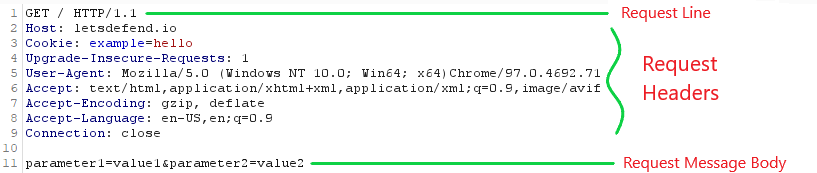
An HTTP request consists of a request line, request headers, and a request message body. The request line consists of the HTTP method and the resource requested from the web server. The request headers contain certain headers that the server will process. The request message body contains the data to be sent to the server.
The image above shows an example of an HTTP request. Let's examine this HTTP request line by line.