Cross-site scripting (XSS) is a type of injection-based web security vulnerability that can be incorporated into legitimate web applications, allowing malicious code to be executed.
Today, most frameworks used to develop web applications have taken preventative measures against cross-site scripting attacks. However, we still see XSS vulnerabilities today because frameworks are sometimes not used, or the framework itself has an XSS vulnerability and the data coming from the user is not sanitized.
There are 3 types of XSS. These are:
Like other web attack methods, XSS is a vulnerability that is caused by a lack of data sanitization. It occurs when the data received from the user is sent in the response without being sanitized.
Let's look at an example to understand XSS attacks better.
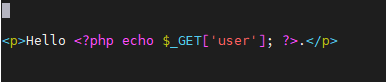
First, we'll examine the piece of code above. What it does is actually quite simple. It simply displays whatever is entered in the 'user' parameter. If we enter "LetsDefend" as the 'user' parameter, we will see the words "Hello LetsDefend".

So far there is no problem. If we enter the appropriate data in the user parameter, we are greeted with a warm welcome. But, as we have already seen, there is no control mechanism for the user parameter. This means that whatever we put in the "user" parameter will be included in the HTTP response we receive back.
So what would happen if we didn't enter a normal value, but instead a payload that would trigger a popup?
Payload: <script>alert(1)</script>

Because whatever is put in the 'user' parameter is included directly in the HTTP response, the javascript code we wrote worked and a pop-up window appeared on the screen.