Like everyone else, SOC analysts can make mistakes. In this section, we will discuss common mistakes made by SOC analysts and how to avoid making them yourself.
It is recommended that you review this lesson after you have completed the previous lessons in this course.
Sometimes we can rely on the result displayed on VirusTotal's green screen after analyzing a file's URL and seeing that the address is harmless. However, there is a new malicious software developed using an AV (AntiVirus) bypass technique that may not be detected by VT (VirusTotal). For this reason, we should accept VirusTotal as a supporting tool and perform our analyses with this in mind.
Here's a detailed blog post on the subject for further reading: VirusTotal is not an Incident Responder
A 3-4 minute analysis in a sandbox environment may not always yield accurate results. Here are the reasons why:
Malware might be able to detect a sandbox environment and will not activate itself.
Malware may not become active for 10 to 15 minutes after the operation is performed.
For this reason, the duration of the analysis should be kept as long as possible and it should take place in a real environment, if possible.
Occasionally we see that some log analysis is not performed properly. For example, let's say that a piece of malware has been detected on a machine with the hostname "LetsDefend", and that malware is secretly sending data to the address "letsdefend.io". As a SOC analyst, you should use Log Management solutions to determine if any other device is also attempting to connect to this address.
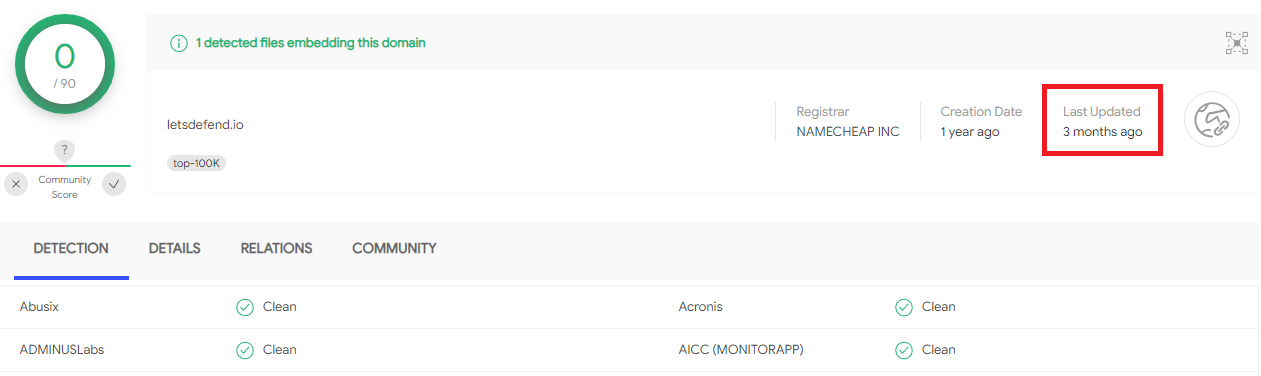
If the search you performed in VirusTotal has already been queried, a result from the cache will be displayed. For example: We searched the address "letsdefend.io" in VirusTotal and the result is shown below.
An attacker could simply search a clean URL on VirusTotal and replace it with malicious content. This is why you should not just look at the search cache, but conduct a new search.